
Attempting to use Griffin Powermate as an input device on Linux
What is a Powermate?
The Griffin Powermate is a sturdy and elegant USB dial input device.
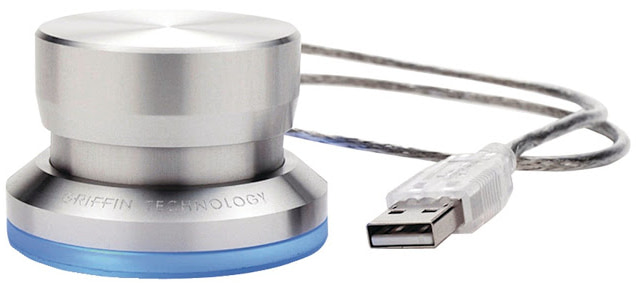
Production has been discontinued but the device is still use to find on sites like e-bay. It would be nice to use the Powermate in day to day use, if not as a dial, at least as emulation of usual keys, like UP and DOWN, or as a combination of keys, for example to zoom like with Ctrl-’+’ Ctrl’-’ keys.
As there is a Linux driver for Powermate since kernel 2.6, I expected to find an easy way to integrate the Powermate in the input devices of my (physical) desktop. In addition, the driver is based on the venerable Linux Input Subsystem, a robust code foundation you can still count on enough to have articles more than 20 years old still relevant (see Linux Journal Part I and Part II).
Trying to map Powermate input events to Keyboard events
I hoped to use Input Subsystem tools and documentation to map events generated by the Powermate to “standard” keyboard events. Indeed, there is a plenty of articles on how to remap exotic keyboards. here is a selection:
- Remapping Keyboard Keys in Ubuntu with udev / evdev
- High-Performance Linux Key Remapping: Kernel-Level Mapping with udev hwdb
- Remap keyboard keys in GNU/Linux
- howto: remapping keys on linux
Mapping keys can be summarized by the following steps:
Finding input events generated by the Powermate
The evtest command, without parameters, allows you to discover which input devices are attached.
Once you know the device either by event number or by id, it is possible to get the available events
# evtest /dev/input/by-id/usb-Griffin_Technology__Inc._Griffin_PowerMate-event-if00                          �?�SIGINT�
Input driver version is 1.0.1
Input device ID: bus 0x3 vendor 0x77d product 0x410 version 0x400
Input device name: "Griffin PowerMate"
Supported events:
  Event type 0 (EV_SYN)
  Event type 1 (EV_KEY)
    Event code 256 (BTN_0)
  Event type 2 (EV_REL)
    Event code 7 (REL_DIAL)
  Event type 4 (EV_MSC)
    Event code 1 (MSC_PULSELED)
Properties:
Testing ... (interrupt to exit)
A list of events can be quickly done from the tests :
- Rotate right: type 2 (EV_REL), code 7 (REL_DIAL), value 1
- Rotate left: type 2 (EV_REL), code 7 (REL_DIAL), value -1
- Press button: type 1 (EV_KEY), code 256 (BTN_0), value 1
- Release button: type 1 (EV_KEY), code 256 (BTN_0), value 0
Note: PULSELED is not an input but a command to change led state of the device.
Updating event Hardware Database with Powermate keys
Such a database, created in /etc/udev/hwdb.d/, is applied to the system compiled version thanks to the following command:
sudo systemd-hwdb update
Changes are applied using command:
sudo udevadm trigger /dev/input/event*
Therefore, I created /etc/udev/hwdb.d/50-griffin-powermate.hwdb and began editing it
# Bus 001 Device 054: ID 077d:0410 Griffin Technology PowerMate
# Input device ID: bus 0x3 vendor 0x77d product 0x410 version 0x400
# evdev:input:b<bus_id>v<vendor_id>p<product_id>e<version_id>-<modalias>
evdev:input:b0003v077Dp0410*
  KEYBOARD_KEY_1=enter
And then I stopped: I never found how to map dial events (REL_DIAL) to keyboard (EV_KEY) events.
The only event I could map from Powermate is the EV_KEY event corresponding to dial press.
Workaround attempt: try mapping applications
As usual, ArchLinux Wiki is of great helps with its list of Input remap utilities. After testing several of them, notably evsieve, I figured out that they could not do anything to handle non keyboard events.
For now: restricting use for home-made applications
This is not the goal I had in buying the Powermate but at least, let’s use it in my code. I saw a proof of concept in a Stackexchange post on how to use events in your own code. The python mapping to evdev provides a convenient way to integrate the Powermate in you applications. I wrote a very basic example which will run for all linux users, provided you add a udev rule to give access to the device.